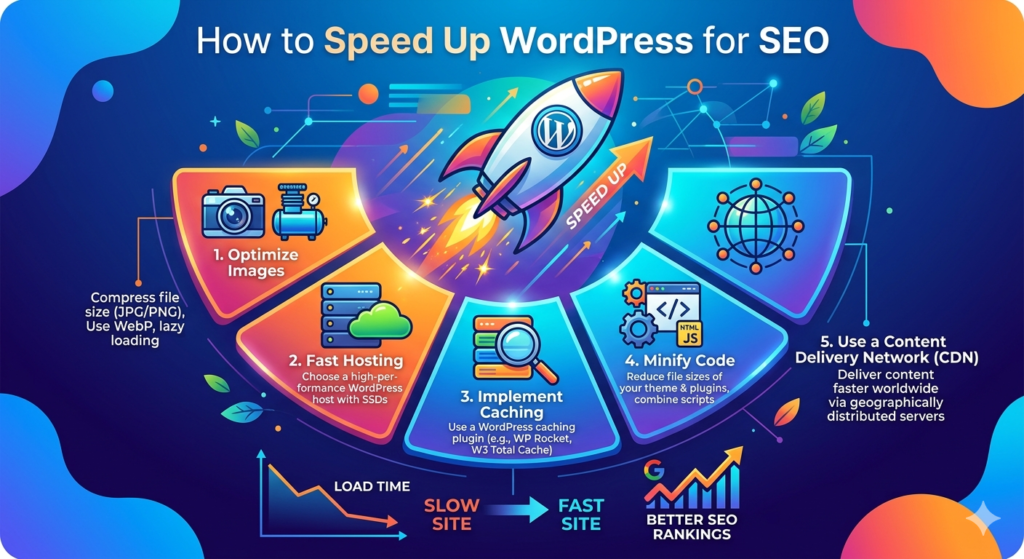

How to Speed Up WordPress for SEO When it comes to climbing the rankings on Google, website velocity is no longer just a nice perk—it is an absolute necessity. If your digital home takes more than two seconds to load, your visitors are going to bounce faster than a rubber ball on concrete, and search engines will notice. Knowing how to speed up wordpress for seo is the foundational secret to driving organic traffic, keeping readers engaged, and satisfying Google’s strict Core Web Vitals.
The relationship between your loading times and your visibility on search engine results pages (SERPs) is deeply intertwined. Search engines want to provide their users with the absolute best experience possible, which means bloated, sluggish websites get pushed down the line. When you focus heavily on the core concept of how to speed up wordpress for seo, you are not just optimizing code; you are actively building trust with your audience and the algorithms that rank you.
Let’s dive into the ultimate blueprint to transform your lagging site into an absolute speed demon. We will break down exactly how server environments, heavy media assets, and script handling can make or break your SEO strategy. Here is a quick snapshot of the core optimization pillars we will cover today.
Quick Facts: WordPress Speed & SEO Optimization
| Optimization Focus | Target Metrics Impacted | Recommended Actionable Tools | Expected SEO Impact |
| Web Hosting | TTFB, LCP | Kinsta, WP Engine, SiteGround | Critical Baseline |
| Media Assets | LCP, Page Weight | EWWW Image Optimizer, Imagify | Massive Boost |
| Caching Layer | TTFB, Server Load | WP Rocket, LiteSpeed Cache | High Efficiency |
| Script Handling | INP, Render Blocking | Perfmatters, Autoptimize | High Technical Win |
1. Upgrade Your Hosting to Drastically Lower TTFB
Your choice of web hosting serves as the absolute bedrock of your entire website infrastructure. If your underlying server architecture is sluggish, no amount of caching plugins or image compression tools will save your performance. For maximum visibility, understanding how to speed up wordpress for seo starts at the server level, where your Time to First Byte (TTFB) is determined.
Cheap, shared hosting packages crowd thousands of independent sites onto a single server environment, forcing them to fight over the exact same processing power and memory space. When a search engine bot or a real user hits your URL, a resource-starved server will take a long time to respond, instantly ruining your Largest Contentful Paint (LCP) score. Upgrading to a specialized, managed WordPress hosting infrastructure provides you with isolated server environments, high-speed NVMe storage, and server-side configurations explicitly tailored to handle database queries quickly.
To properly implement this pillar of how to speed up wordpress for seo, look for hosts that utilize modern web servers like LiteSpeed or NGINX rather than outdated Apache frameworks. They should also provide native integration with modern PHP environments (like PHP 8.2 or higher), which process instructions significantly faster than older setups. Making this foundational shift immediately drops your initial server response times, signaling to search crawlers that your platform is reliable, fast, and completely ready to handle high volumes of traffic.
2. Eliminate Visual Bloat with Advanced Media Optimization
Unoptimized media assets represent the single heaviest burden on modern web pages, frequently crushing visual loading milestones. When you are mapping out how to speed up wordpress for seo, conquering your media library is an absolute priority that yields massive, immediate improvements. High-resolution photos straight from stock websites or graphic design tools can easily weigh multiple megabytes, which completely stalls browser rendering on mobile data connections.
To solve this visual bottleneck, your first step should be migrating entirely away from legacy file types like JPEG and PNG in favor of modern, next-generation formats like WebP and AVIF. These modern formats maintain stunning visual fidelity while reducing overall file sizes by up to 30% to 40% compared to standard image formats. You can effortlessly automate this entire process across your active media library using reliable, automated compression plugins that handle the heavy lifting quietly in the background.
[User Browser] ——(Requests Page)——> [WordPress Site]
[User Browser] <—(Loads WebP Image)—— [Lazy Loading Activates]
Beyond basic compression, proper execution of how to speed up wordpress for seo demands the strategic deployment of lazy loading. Lazy loading ensures that the browser only downloads images as the reader actively scrolls down the page, keeping the initial payload incredibly light. Additionally, always make sure to explicitly define width and height attributes for every piece of media inside your layout to prevent annoying layout shifts, protecting your Cumulative Layout Shift (CLS) scores from taking an unwanted hit.
3. Implement Layered Caching and Global CDNs
Every single time a visitor opens a page on an uncached WordPress site, your server has to build that page from scratch by pulling text, layouts, and styles out of a database. This dynamic generation cycle eats up massive amounts of processing energy and adds seconds to your loading times. Mastering how to speed up wordpress for seo requires you to put a dead stop to this repetitive loop by implementing a comprehensive, multi-layered caching framework.
Page caching captures a snapshot of the fully assembled HTML code after that very first generation and serves that pre-built static file to every subsequent user instantly. This lightens the operational burden on your database, ensuring your site loads quickly even during sudden viral traffic spikes. For dynamic blogs and complex e-commerce hubs, adding an advanced object caching tool like Redis or Memcached works wonders by storing repetitive database queries directly within your server’s system memory.
Uncached: [User] —> [Server] —> [Database Query] —> [Build HTML] —> [User]
Cached: [User] ————————> [Static HTML Cache] ———–> [User]
To take your caching strategy global, pair your site with a robust Content Delivery Network (CDN) like Cloudflare. A CDN clones your static assets across a massive network of servers positioned all over the globe, meaning a user browsing from Tokyo will download your files from a local Tokyo data center instead of waiting for your main server in Chicago to reply. This geographical optimization drops latency to negligible levels, giving you a massive edge in international search visibility.
4. Tame Heavy Scripts and Optimize JavaScript
The modern web is heavily driven by complex code, but excessive script bloat is a massive threat to your site’s interactive responsive capabilities. When exploring how to speed up wordpress for seo, you must address how your site handles JavaScript and CSS styles. Heavy page builders, oversized themes, and tracking tracking pixels inject massive mountains of code that freeze browsers, directly leading to poor Interaction to Next Paint (INP) metrics.
To clear out these digital roadblocks, look for a performance plugin that can safely defer non-essential scripts so they execute only after your primary content finishes rendering on screen. For instance, heavy tracking utilities like the Meta Pixel or Google Analytics can be safely delayed until a reader actually interacts with the screen. This small optimization frees up precious processing threads early on, allowing the browser to display text and layout elements almost instantly.
Additionally, make sure to minify your style documents and JavaScript assets by stripping out empty spaces, line breaks, and developer comments from the underlying source files. Whenever possible, ruthlessly audit your plugin stack and completely remove redundant tools that load their custom code sitewide even when they are only active on a single page. Keeping your codebase lean ensures that search bots can effortlessly crawl your pages without wasting their allocated crawl budget on heavy, unoptimized code scripts.
5. Clean Up and Streamline Your WordPress Database
As your website grows over months and years of constant content creation, your underlying MySQL database naturally collects an immense amount of digital clutter. Every time you save a rough draft, a comment gets flagged as spam, or a plugin is deleted, orphaned data and configuration lines get permanently left behind. If you want to know how to speed up wordpress for seo over the long haul, regular database maintenance is essential to keeping your query speeds fast.
A bloated database forces your hosting server to sift through thousands of obsolete data rows just to find the core post content a visitor is trying to read. You can clean up this administrative overhead by regularly purging old post revisions, cleaning out expired transient options, and emptying your trash folders. Setting up an automated weekly or monthly database optimization routine ensures that your information tables remain perfectly organized, compact, and highly responsive.
[Bloated DB: 5,000 Revisions + Spam] —> Slow Sifting —> Delays Response
[Optimized DB: Clean Data Tables] —> Instant Find —> Rapid Response
Furthermore, pay close attention to what is known as your “autoloaded data”—which consists of configuration options that load into system memory on every single page view. If legacy plugins have left behind massive, multi-megabyte configurations in your options table, your entire site will feel noticeably sluggish. Keeping this autoload layer well under 1MB ensures that your server stays lightning-fast, directly feeding into the quick loading times that search algorithms reward.
Frequently Asked Questions (FAQ)
Can using too many speed optimization plugins actually slow down my site?
Yes, absolutely. Running multiple performance plugins that try to handle the exact same tasks (like minification or image optimization) creates intense software conflicts, breaks layouts, and adds unnecessary processing overhead. It is always best practice to use a single, comprehensive premium performance suite or a few carefully chosen, lightweight utilities that handle distinct parts of your optimization strategy without overlapping.
What is the ideal target score for Google PageSpeed Insights?
While hitting a perfect 100/100 score on desktop and mobile feels fantastic, your true goal should be achieving a consistent “Green” status (90+) while fully passing the actual field data requirements for Core Web Vitals. Google heavily prioritizes real-world user metrics like Largest Contentful Paint (under 2.5 seconds) and Interaction to Next Paint (under 200 milliseconds) over a purely theoretical laboratory score.
Why is mobile speed so much more critical for SEO than desktop performance?
Google uses mobile-first indexing, meaning its automated search bots crawl, evaluate, and rank your website layout based entirely on how it performs on a simulated mobile device over a standard mobile data connection. A site that loads instantly on a powerful desktop computer could still rank poorly if it chokes on a mid-range smartphone due to heavy scripts and uncompressed assets.
Does a fast website directly guarantee top rankings on Google?
Website speed is a critical, foundational search engine ranking signal, but it works in tandem with high-quality content, strong on-page SEO, and a healthy backlink profile. Think of speed optimization as your ticket into the game; it ensures that once your stellar content earns an audience, your technical performance keeps them there instead of bouncing them back to the search results.
This guide covers the major building blocks of speed optimization. If you’d like to work on a specific part of your site next, what should we focus on? We could take a look at running a speed test to find your biggest bottlenecks, or dive into picking the right settings for a caching plugin. Let me know which path you want to take!